Using Outlook
Using your NABET Local 53 Email with Outlook
FOR POP3 ACCOUNTS (for IMAP accounts click here)
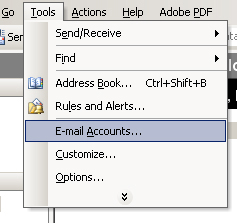
1.) From the {Tools} menu, select {Email Accounts} (NOTE: For Outlook 2007 or newer, from the ribbon, select {File/Info/Account Settings})
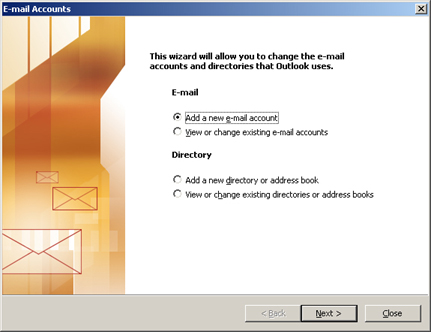
2.) Then choose {Add a new e-mail account} (as shown below)
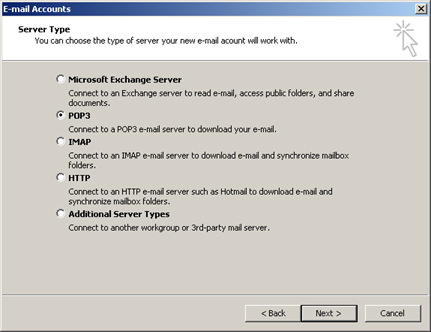
3.) Choose POP3 server type, then click {Next}
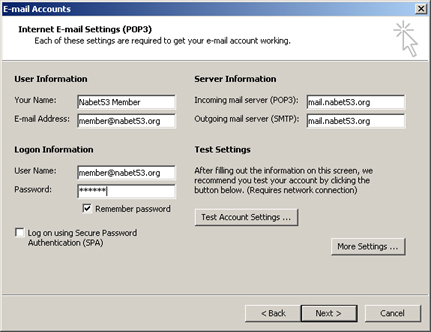
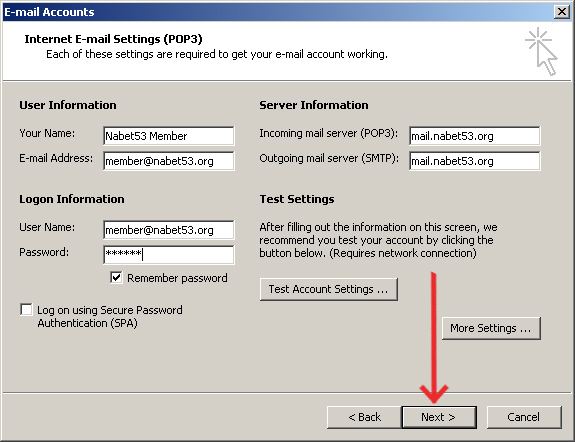
4.) Fill in the user information as shown substituting your own personal information, then click {Next}. E-mail addresses and account login names are based upon This email address is being protected from spambots. You need JavaScript enabled to view it.. For example, mail for member Jane Smith will be This email address is being protected from spambots. You need JavaScript enabled to view it.. The mail server name is mail.nabet53.org
Trouble logging in? Account names have been created from the information NABET Local 53 has on file. Let's say the name you go by is 'Larry Smith', but the information on file is Lawrence Smith. In this example, your email address and user name would be This email address is being protected from spambots. You need JavaScript enabled to view it.. The same would be true for spouses with hyphenated married names. As an example, Mary Smith-Jones would have an email address and user name of This email address is being protected from spambots. You need JavaScript enabled to view it..
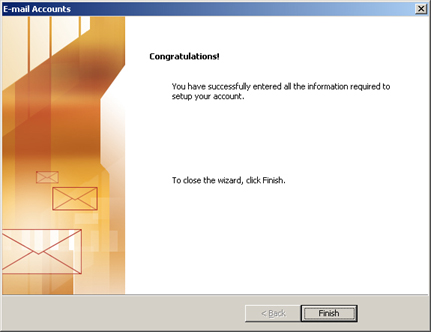
5.) Click {Finish}
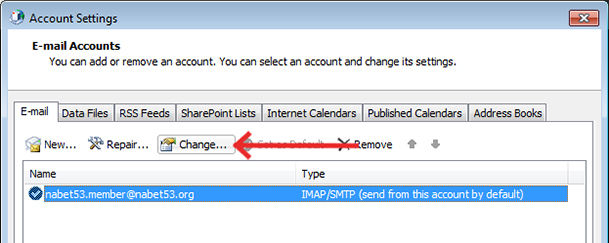
6.) From the {Tools} menu, select {Email Accounts} (NOTE: For Outlook 2010 or newer, from the ribbon, select {File/Info/Account Settings}) Select the Nabet53 account, then click the {Change} button
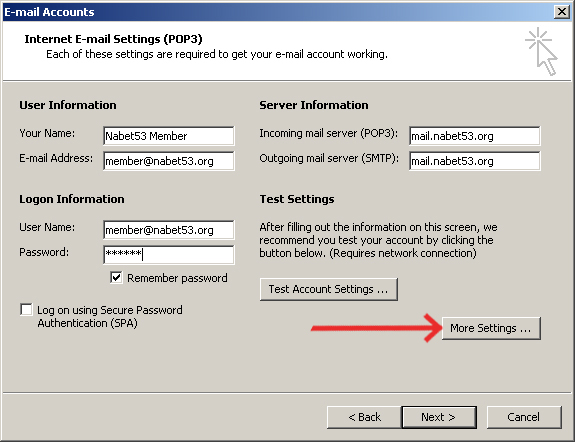
7.) Click the {More Settings} button.
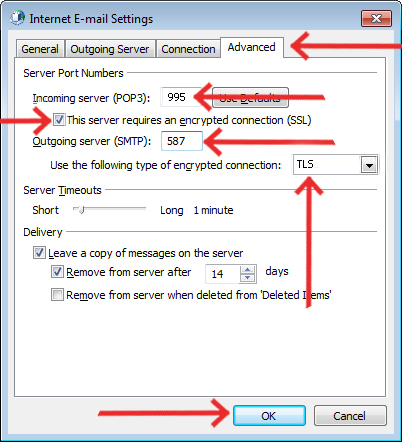
8a.) mail.nabet53.org is a secure server that requires advanced settings. Click the {Advanced} tab.
- Insure the POP3 server is set for port {995}. Edit the entry if needed, then click the checkbox (This server requires an encrypted connection (SSL)}
- Insure the {Outgoing Server} is set for port 587. Edit the entry if needed, then select {TLS} as the encryption type from the dropdown box.
- DO NOT CLICK {OK} yet...
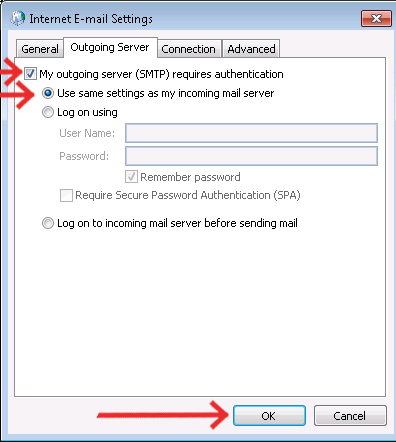
8b.) Click the {Outgoing Server} tab. Click the checkbox, {My outgoing server (SMTP) requires authentication. Leave the default setting {Use same settings as my incoming mail server} set. Click {OK}
9.) Click {Next} to complete Account Settings.
Congratulations. You are now ready to begin using your NABET Local 53 email account
FOR IMAP ACCOUNTS (see above for POP3 accounts)
1.) From the {Tools} menu, select {Email Accounts} (NOTE: For Outlook 2007 or newer, from the ribbon, select {File/Info/Account Settings})
2.) Then choose {Add a new e-mail account} (as shown below)
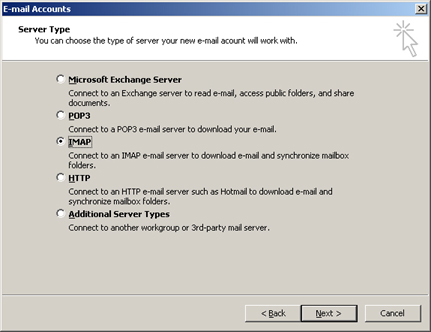
3.) Choose IMAP server type, then click {Next}
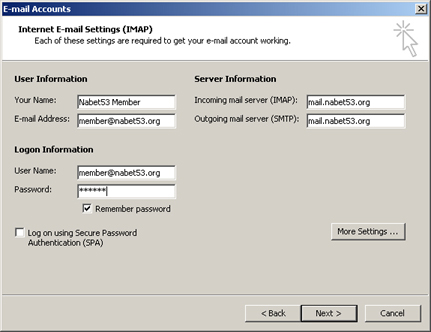
4.) Fill in the user information as shown substituting your own personal information, then click {Next}. E-mail addresses and account login names are based upon This email address is being protected from spambots. You need JavaScript enabled to view it.. For example, mail for member Jane Smith will be This email address is being protected from spambots. You need JavaScript enabled to view it.. The mail server name is mail.nabet53.org
Trouble logging in? Account names have been created from the information NABET Local 53 has on file. Let's say the name you go by is 'Larry Smith', but the information on file is Lawrence Smith. In this example, your email address and user name would be This email address is being protected from spambots. You need JavaScript enabled to view it.. The same would be true for spouses with hyphenated married names. As an example, Mary Smith-Jones would have an email address and user name of This email address is being protected from spambots. You need JavaScript enabled to view it..
5.) Click {Finish} You are now ready to begin using your NABET Local 53 email account
6.) From the {Tools} menu, select {Email Accounts} (NOTE: For Outlook 2010 or newer, from the ribbon, select {File/Info/Account Settings}) Select the Nabet53 account, then click the {Change} button
7.) Click the {More Settings} button.
8a.) mail.nabet53.org is a secure server that requires advanced settings. Click the {Advanced} tab.
- Insure the IMAP server is set for port {993}. Edit the entry if needed, then click the dropdown box (Use the following type of encrypted connection {SSL})
- Insure the {Outgoing Server} is set for port 587. Edit the entry if needed, then select {TLS} as the encryption type from the dropdown box.
- DO NOT CLICK {OK} yet...
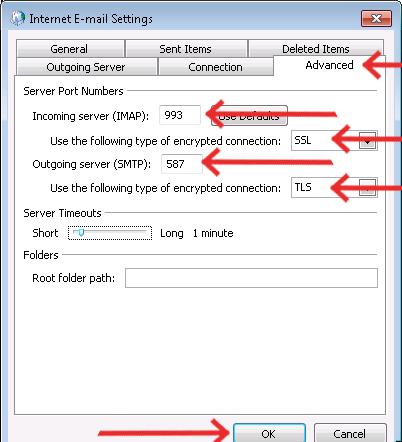
8b.) Click the {Outgoing Server} tab. Click the checkbox, {My outgoing server (SMTP) requires authentication. Leave the default setting {Use same settings as my incoming mail server} set. Click {OK}
9.) Click {Next} to complete Account Settings.
Congratulations. You are now ready to begin using your NABET Local 53 email account

Latest Events
| FOX/KTTV/DISNEY FX Shop Stewards Meeting Tue, Jun 09, 6:00pm - 8:00pm |
| Executive Board Meeting Thu, Jun 11, 11:00am - 1:00pm |
| NBC Shop Steward Meeting Thu, Jun 11, 6:00pm - 8:00pm |
Featured Links